337 ways to join the fight
Use “Trocar lutador” (change fighter) to find your character and discover different styles. Open “Explorar” (explore), then choose “Golpes” (moves) to learn their attacks or “Treino” (training) to try available Ultras.
Rift Stars: Elemental Arena
One arena, plenty of ways to join the fight. Take on the CPU, gather friends on the same couch or open an online room. Your keyboard is already a controller.
Keyboard · Gamepad · Phone · Touch
Rift Stars is a platform fighter: movement, powers and spectacular knockouts are all part of the contest. Learn the basics in one match and find new combinations in the next.
Use “Trocar lutador” (change fighter) to find your character and discover different styles. Open “Explorar” (explore), then choose “Golpes” (moves) to learn their attacks or “Treino” (training) to try available Ultras.
Search for an arena by name or universe. Wind, ice, portals and stage-specific rules change the course of a fight: watch the arena and its warnings to find a good position.
Items appear during a match and open up new possibilities. Pick up a consumable and use the heavy attack command to activate it; your normal attack returns when it runs out.
Match over? Play a rematch, switch fighters or return to the start. In local play, wins are saved by player name in that browser.
You do not need a gamepad to play. A keyboard and mouse are enough; every attack also has a keyboard shortcut.
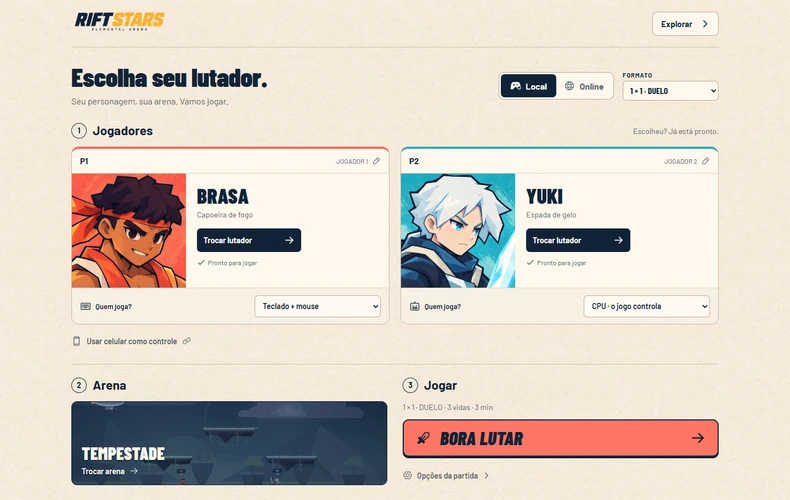
Choose Local and a match format. Under “Quem joga?” (who is playing?), choose keyboard, gamepad, phone or CPU for each slot. To play solo, set your opponents to CPU.
Press “Trocar lutador” on a player card and search for a character. Your choice is ready immediately. Pick an arena and press “Bora lutar”; lives and time are under “Opções da partida” (match options).
Build up your opponents’ damage and launch them out of the arena. Use your double jump, dodge and magic to get back. Lose all your lives and you are out.
First tip: Space jumps, F attacks and G casts magic. Press Space again in the air for a second jump. To recover toward the arena, combine up with magic.
Play against CPU opponents controlled by the game, or invite people to join. These formats are available in local matches and invite rooms.
You and one opponent. A great place to learn your moves against the CPU or challenge a friend.
A duo on one side, one fighter on the other. Pick your side and try a deliberately uneven match.
Two teams share the arena. Coordinate pressure with your teammate and make room for both of you to stay in the fight.
Three or four fighters, everyone against everyone. The last player with lives wins; at the time limit, remaining lives and then lower damage decide.
For solo playIn local mode, choose CPU in the other player slots. Use “Trocar lutador” on an opponent’s card to choose who you face.
For one shared computerOne person uses the keyboard and mouse; the others use gamepads or phones paired by QR code. Each person needs their own input device.
Use what you already have. Play with the keyboard alone, combine it with a mouse, connect a gamepad or use a touchscreen.
| Action | Keyboard + mouse | Gamepad Xbox / PlayStation |
|---|---|---|
| Move | A / D | Stick / D-pad |
| Jump / double jump | Space or W; press again in the air | A / × |
| Crouch | Hold S | Down on stick / D-pad |
| Drop through a platform | S + jump | Down + A / × |
| Attack | Left click or F | X / □ |
| Magic | Right click or G | Y / △ |
| Dodge | Left Shift or H | LB / L1 |
| Heavy attack / use item | Q | B / ○ |
| Supreme | E | RB / R1 |
| Ultra, when available | R | RT / R2 |
Power at the right momentSupreme needs energy; Ultra has a separate meter and is available for fighters that have that move. Wait for the charge indicator before using them.
Setup and helpOn the couch screen, use a mouse or touch to choose player slots, fighters and settings. “Como jogar” (how to play) opens help. During a fight, press Escape or the pause button and choose “Controles” (controls). Help only pauses local matches. Sound, phone pairing and the return to setup are also in the pause menu.
Short on gamepads? Each player can connect their own phone and play while watching the computer screen.
On the couch screen, select the player slot and press “Usar celular como controle” (use your phone as a controller). Check the slot under “Quem vai jogar?” (who is playing?). During a fight, open the pause menu and choose “Celular” (phone).
Point your phone camera at the QR code and open the link. The connection happens in your browser, with no app to download.
Wait for the connection confirmation, close the QR and choose “Voltar ao sofá”. The player slot now uses the connected phone. Choose the fighters and press “Bora lutar”; on your phone, use the directional pad and buttons in portrait or landscape.
Keep the game tab open and both devices connected to the internet. The same Wi-Fi network usually responds better. Online, each person pairs a phone with their own computer and controls only their own player.
Online, each person plays in their own browser with their preferred controls. Invite friends with a room code or explore the public queue option.
A room holds up to four people. The room creator must keep their tab open; leaving ends the room. Connection quality affects how responsive the controls feel.
The queue depends on the online service being available and other players joining. CPU opponents do not fill empty slots. If the search is unavailable, you can play locally or try an invite room.
Rooms and phone controllers need an internet connection to connect. Some networks may prevent players from connecting to each other. Local keyboard or gamepad play does not depend on the room service.